검색결과 리스트
글
FiftyOne 라이브러리로 Segmentation 데이터셋 볼 때 각 클래스별로 따로 볼 수 있도록 설정하는 방법
공대생의 팁
2026. 3. 21. 15:27

Vision AI엔지니어로서 8년째 일하고 있음에도 최근까지 AI모델에만 매달리다가 현장에서 갓 생산된 데이터를 AI모델이 쉽게 받아들이도록 가공해야 성능 향상에 도움이 된다는 것을 최근에야 깨닫게 되었고, 실제 데이터 중심의 연구를 수행하는 AI엔지니어들이 현장에서 더 많은 역할을 하고 있음을 확인할 수 있었습니다. 좋은 데이터를 통해 좋은 AI모델이 만들어짐을 알지만, 어떻게 하면 우리들이 원하는 데이터로 만들 수 있는지 탐색하는 것도 쉽지 않았는데, 이러단 Vision 데이터셋들을 쉽게 관리할 수 있는 FiftyOne 라이브러리가 존재함을 알게 되었습니다.
FiftyOne 라이브러리는 컴퓨터 비전 데이터셋을 구축, 시각화, 평가할 수 있는 강력한 오픈소스 데이터 관리 툴입니다. 대규모 이미지나 비디오 데이터를 효율적으로 탐색하고, 모델의 예측 결과를 직관적으로 분석할 수 있어 AI 연구 및 실무에서 실제 널리 활용되고 있다합니다. 다만, 라이브러리 자체에서 제공하는 기능들을 내가 원하는 대로 쓰기 위해서는 어느 정도 데이터 가공이 필요했습니다. 특히 Semantic Segmentation 모델을 주로 사용해온 저에게는 좋은 도구가 있음에도 쉽게 사용하지 못해 약간의 장벽을 느끼기도 하지만 우리의 훌륭하신 GPT 형님들이 친절하게 사용방법을 잘 알려주십니다.
본 글에서는 FiftyOne 환경에서 Semantic Segmentation 모델의 데이터를 다룰 때 발생하는 시각화의 한계를 짚어보고, 이를 극복하여 분석 효율을 극대화하는 실무적인 데이터 전처리 기법을 소개합니다.
Semantic Segmentation 모델을 Fiftyone에서 사용할 때 발생하는 문제점들
FiftyOne을 활용해 Semantic Segmentation 데이터셋을 분석하고자 할 때, 흔히 직면하는 구조적인 제약이 있습니다. Instance Segmentation 데이터와 달리, Semantic Segmentation은 일반적으로 하나의 마스크(Mask) 이미지 내에 모든 클래스(Class) 정보가 픽셀 값으로 통합되어 저장된다는 점입니다. 이로 인해 FiftyOne 뷰어 상에서 내가 원하는 특정 클래스만 독립적으로 분리하여 시각화하거나 분석하는 데 어려움이 따릅니다.
그래서 아래의 코드를 통해 GT 혹은 Pred 데이터에서 각각의 Class를 별도로 추출한 다음, 이를 FiftyOne DB에 적재하여 각 class별로 데이터를 확인할 수 있도록 하였습니다.
※ 본 소스코드는 Fiftyone 1.2.0 버전을 기준으로 작성되었습니다.
fiftyone_loader.py
|
1
2
3
4
5
6
7
8
9
10
11
12
13
14
15
16
17
18
19
20
21
22
23
24
25
26
27
28
29
30
31
32
33
34
35
36
37
38
39
40
41
42
43
44
45
46
47
48
49
50
51
52
53
54
55
56
57
58
59
60
61
62
63
64
65
66
67
68
69
70
71
72
73
74
75
76
77
78
79
80
81
82
83
84
85
86
87
88
89
90
91
92
93
94
95
96
97
98
99
100
101
102
103
104
105
106
107
108
109
110
111
112
113
114
115
116
117
118
119
120
121
122
123
124
125
126
127
128
129
130
131
132
133
134
135
136
137
138
139
140
141
142
143
144
145
146
147
148
149
150
151
152
153
154
155
156
157
158
159
160
161
162
163
164
165
166
167
168
169
170
171
172
173
174
175
176
177
178
179
180
181
182
183
184
185
186
187
188
189
190
191
192
193
194
195
196
197
198
199
200
201
202
203
204
205
206
207
208
209
210
211
212
213
214
215
|
import fiftyone as fo
import os
import numpy as np
from PIL import Image
# ==========================================
# 1. Dataset Classes (클래스 매핑)
# ==========================================
VOC_CLASSES = {
0: "background", 1: "aeroplane", 2: "bicycle", 3: "bird", 4: "boat",
5: "bottle", 6: "bus", 7: "car", 8: "cat", 9: "chair", 10: "cow",
11: "diningtable", 12: "dog", 13: "horse", 14: "motorbike", 15: "person",
16: "pottedplant", 17: "sheep", 18: "sofa", 19: "train", 20: "tvmonitor",
255: "void"
}
CITYSCAPES_CLASSES = {
0: "road", 1: "sidewalk", 2: "building", 3: "wall", 4: "fence",
5: "pole", 6: "traffic light", 7: "traffic sign", 8: "vegetation",
9: "terrain", 10: "sky", 11: "person", 12: "rider", 13: "car",
14: "truck", 15: "bus", 16: "train", 17: "motorcycle", 18: "bicycle",
255: "unlabeled"
}
ADE20K_CLASSES = {
0: "background", 1: "wall", 2: "building", 3: "sky", 4: "floor",
5: "tree", 6: "ceiling", 7: "road", 8: "bed", 9: "windowpane",
# 필요시 추가 클래스 확장 (최대 150개)
}
MAPILLARY_CLASSES = {
0: "Bird", 1: "Ground Animal", 2: "Curb", 3: "Fence", 4: "Guard Rail",
5: "Barrier", 6: "Wall", 7: "Bike Lane", 8: "Crosswalk", 9: "Curb Cut",
# 필요시 추가 클래스 확장 (최대 65/124개)
}
# ==========================================
# 2. 데이터셋 포맷별 디폴트 설정 (Suffix 꼬리표 포함)
# ==========================================
DATASET_DEFAULTS = {
"VOC": {
"image_folder": "JPEGImages", "gt_folder": "SegmentationClass",
"image_ext": ".jpg", "mask_ext": ".png",
"image_suffix": "", "gt_suffix": "",
"classes": VOC_CLASSES
},
"CITYSCAPES": {
"image_folder": "leftImg8bit", "gt_folder": "gtFine",
"image_ext": ".png", "mask_ext": ".png",
"image_suffix": "_leftImg8bit",
"gt_suffix": "_gtFine_labelIds",
"classes": CITYSCAPES_CLASSES
},
"ADE20K": {
"image_folder": "images", "gt_folder": "annotations",
"image_ext": ".jpg", "mask_ext": ".png",
"image_suffix": "", "gt_suffix": "",
"classes": ADE20K_CLASSES
},
"MAPILLARY": {
"image_folder": "images", "gt_folder": "instances",
"image_ext": ".jpg", "mask_ext": ".png",
"image_suffix": "", "gt_suffix": "",
"classes": MAPILLARY_CLASSES
}
}
# ==========================================
# 3. 데이터셋 로더 함수 (치환 및 마스크 분리 로직 포함)
# ==========================================
def load_custom_segmentation_dataset(
dataset_name,
dataset_format,
base_dir="",
# 사용자 지정 경로
custom_image_dir=None,
custom_gt_dir=None,
custom_pred_dir=None,
# 사용자 지정 꼬리표
custom_image_suffix=None,
custom_gt_suffix=None,
custom_pred_suffix=None,
# 적재 옵션
load_gt=True,
load_pred=True
):
format_info = DATASET_DEFAULTS.get(dataset_format.upper())
if not format_info:
raise ValueError(f"지원하지 않는 포맷입니다: {dataset_format}")
# 1. 경로 세팅 (사용자 지정 우선, 없으면 디폴트)
image_dir = custom_image_dir or os.path.join(base_dir, format_info["image_folder"])
gt_dir = custom_gt_dir or os.path.join(base_dir, format_info["gt_folder"])
pred_dir = custom_pred_dir or os.path.join(base_dir, "preds")
image_ext = format_info["image_ext"]
mask_ext = format_info["mask_ext"]
# 2. 꼬리표(Suffix) 세팅 (사용자 지정 우선, 없으면 디폴트)
img_suf = custom_image_suffix if custom_image_suffix is not None else format_info["image_suffix"]
gt_suf = custom_gt_suffix if custom_gt_suffix is not None else format_info["gt_suffix"]
pred_suf = custom_pred_suffix if custom_pred_suffix is not None else gt_suf
# 3. FiftyOne 데이터셋 초기화
if dataset_name in fo.list_datasets():
fo.delete_dataset(dataset_name)
dataset = fo.Dataset(dataset_name)
# 스키마 미리 선언 (클래스명_gt, 클래스명_pred 순서로 UI에 강제 생성)
ignore_classes = ["background", "void", "unlabeled"]
for cls_id, cls_name in format_info["classes"].items():
if cls_name.lower() in ignore_classes:
continue
if load_gt:
dataset.add_sample_field(f"{cls_name}_gt", fo.core.fields.EmbeddedDocumentField, embedded_doc_type=fo.Segmentation)
if load_pred:
dataset.add_sample_field(f"{cls_name}_pred", fo.core.fields.EmbeddedDocumentField, embedded_doc_type=fo.Segmentation)
# UI 색상 매핑 통일
dataset.default_mask_targets = format_info["classes"]
samples = []
if not os.path.exists(image_dir):
raise FileNotFoundError(f"이미지 폴더를 찾을 수 없습니다: {image_dir}")
# 4. 파일 순회 및 분리 적재 로직
for filename in os.listdir(image_dir):
if not filename.endswith(image_ext):
continue
image_path = os.path.join(image_dir, filename)
sample = fo.Sample(filepath=image_path)
# 순수 파일명 추출 및 꼬리표 조립
base_name = filename[:-len(image_ext)]
if img_suf and base_name.endswith(img_suf):
core_name = base_name[:-len(img_suf)]
else:
core_name = base_name
gt_filename = f"{core_name}{gt_suf}{mask_ext}"
pred_filename = f"{core_name}{pred_suf}{mask_ext}"
# GT 적재 (마스크를 클래스별로 쪼개기)
if load_gt:
gt_path = os.path.join(gt_dir, gt_filename)
if os.path.exists(gt_path):
gt_img = np.array(Image.open(gt_path))
for cls_id, cls_name in format_info["classes"].items():
if cls_name.lower() in ignore_classes:
continue
bin_mask = (gt_img == cls_id)
if np.any(bin_mask):
# 저장 필드명을 '클래스명_gt'로 변경
sample[f"{cls_name}_gt"] = fo.Segmentation(mask=bin_mask.astype(np.uint8) * cls_id)
else:
print(f"[경고] GT 마스크 누락: {gt_path}")
# Pred 적재 (마스크를 클래스별로 쪼개기)
if load_pred:
pred_path = os.path.join(pred_dir, pred_filename)
if os.path.exists(pred_path):
pred_img = np.array(Image.open(pred_path))
for cls_id, cls_name in format_info["classes"].items():
if cls_name.lower() in ignore_classes:
continue
bin_mask = (pred_img == cls_id)
if np.any(bin_mask):
# [수정됨] 저장 필드명을 '클래스명_pred'로 변경
sample[f"{cls_name}_pred"] = fo.Segmentation(mask=bin_mask.astype(np.uint8) * cls_id)
samples.append(sample)
dataset.add_samples(samples)
print(f"'{dataset_name}' 데이터셋 구축 완료! (총 {len(samples)}장 적재)")
return dataset
# ==========================================
# 4. 실행 예시 (main 함수)
# ==========================================
if __name__ == "__main__":
# [사용자 설정 영역] 직관적으로 이미지, GT, Pred 경로를 한 곳에서 관리
IMG_DIR = "/path/to/dataset/images"
GT_DIR = "/path/to/dataset/ground_truth"
PRED_DIR = "/path/to/dataset/model_predictions"
# 데이터셋 구축
my_dataset = load_custom_segmentation_dataset(
dataset_name="Segmentation_Analysis_Project",
dataset_format="CITYSCAPES", # VOC, CITYSCAPES, ADE20K, MAPILLARY 중 택 1
# 경로 연결
custom_image_dir=IMG_DIR, custom_gt_dir=GT_DIR, custom_pred_dir=PRED_DIR,
# 꼬리표(Suffix) 설정 (파일명이 모두 동일하다면 빈 문자열("") 지정)
custom_image_suffix="_leftImg8bit",
custom_gt_suffix="_gtFine_labelIds",
custom_pred_suffix="_pred",
# 적재 여부 선택
load_gt=True,
load_pred=False
)
# FiftyOne App 실행
session = fo.launch_app(my_dataset)
session.wait()
|
cs |
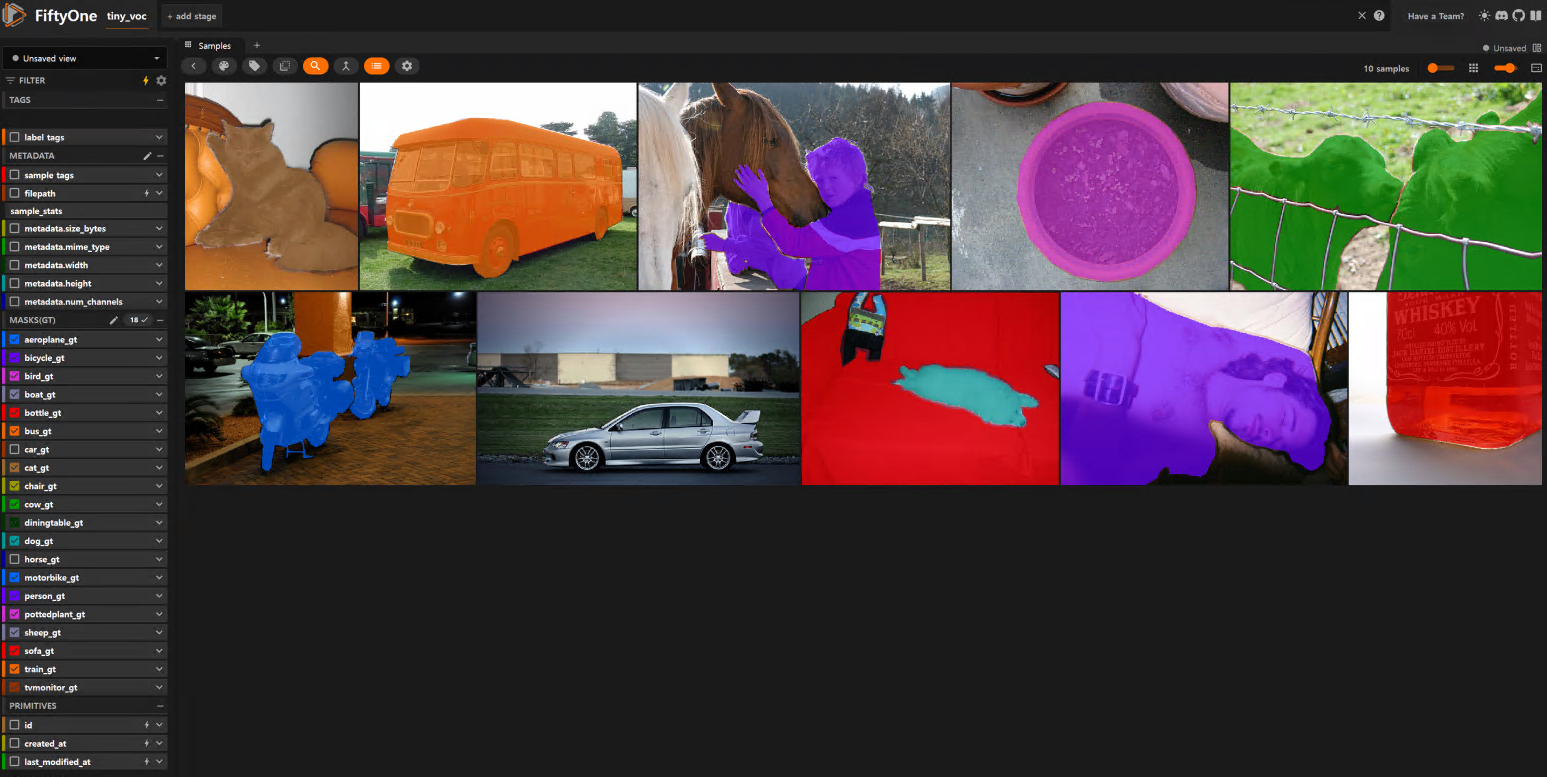
위에서 각각의 클래스를 별개로 저장한 다음 FiftyOne에 적재하면 각 Class마다 데이터를 별개로 제어할 수 있는 것을 확인할 수 있습니다.
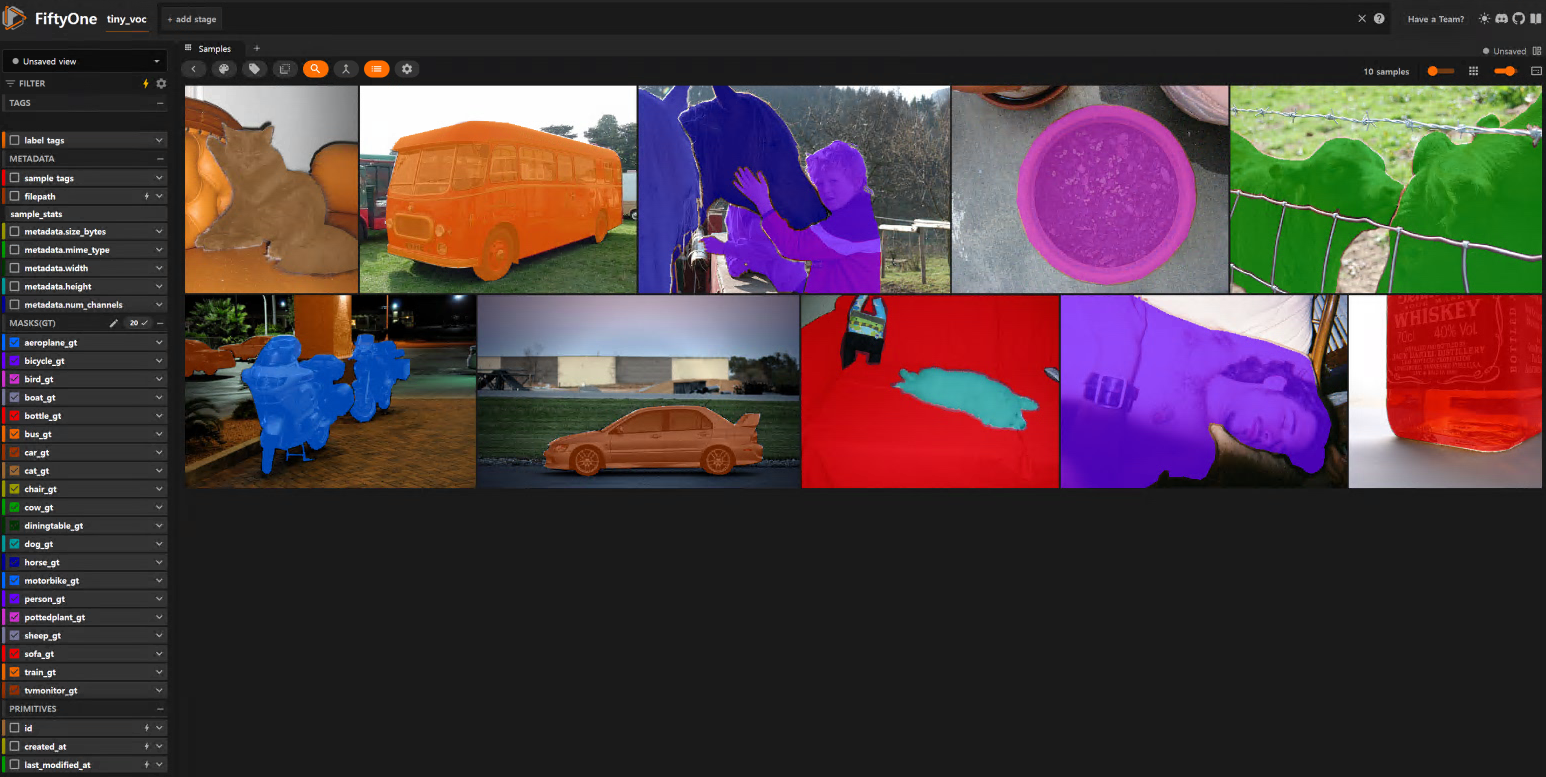
위 데이터셋에서 'horse_gt'와 'car_gt'를 해제하면 말과 자동차의 Segment가 사라지는 것을 확인하실 수 있습니다.
300x250
'공대생의 팁' 카테고리의 다른 글
| Ubuntu 26.04 버전에서 YouTube pip모드 사용시 항상 화면이 상위에 표시하는 방법 (0) | 2026.07.01 |
|---|---|
| Anaconda 환경에서 'ModuleNotFoundError: No module named 'pkg_resources' 에러 발생시 해결방법 (0) | 2026.04.04 |
| [논문 리뷰] 처음 보는 물체도 덥석! 박스 모델링으로 해결하는 로봇의 손동작(Minimum Volume Bounding Box Decompos (0) | 2026.02.01 |
| Ubuntu로 apt 사용시 SSL 인증서 신뢰 문제 발생시 해결방법 (0) | 2025.11.28 |
| Ubuntu에서 Youtube 동영상 PIP모드에서 다른 창에 의해 화면이 가려질 때 해결방법 (0) | 2025.10.28 |
